GeoTiffMetadata - GeoTIFF File Metadata
GeoTiffMetadata is a Spark data source that reads GeoTIFF file metadata without decoding pixel data, similar to gdalinfo. It returns one row per file with metadata including dimensions, coordinate system, band information, tiling, overviews, and compression.
This is useful for:
- Cataloging and inventorying large collections of raster files
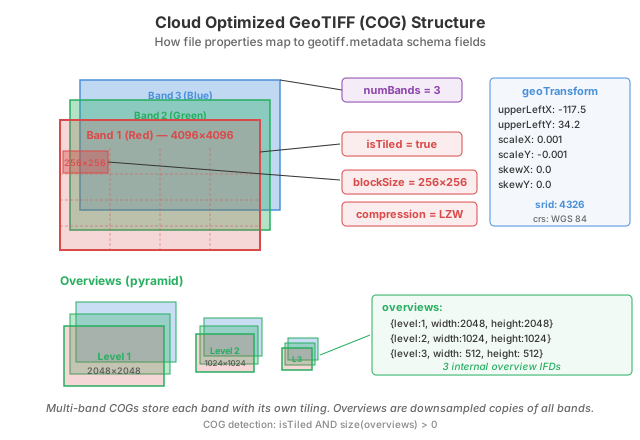
- Detecting Cloud Optimized GeoTIFFs (COGs) by checking tiling and overview status
- Inspecting file properties before loading full raster data
- Building spatial indexes over raster file collections
COG detection
Cloud Optimized GeoTIFFs (COGs) are GeoTIFF files with internal tiling and overviews optimized for cloud access. The geotiff.metadata data source reports these properties directly:
df = sedona.read.format("geotiff.metadata").load("/path/to/rasters/")
cogs = df.filter("isTiled AND size(overviews) > 0")
cogs.select("path", "compression", "overviews").show(truncate=False)
Read GeoTIFF metadata
val df = sedona.read.format("geotiff.metadata").load("/path/to/rasters/")
df.show()
Dataset<Row> df = sedona.read().format("geotiff.metadata").load("/path/to/rasters/");
df.show();
df = sedona.read.format("geotiff.metadata").load("/path/to/rasters/")
df.show()
You can also use glob patterns:
df = sedona.read.format("geotiff.metadata").load("/path/to/rasters/*.tif")
Or load a single file:
df = sedona.read.format("geotiff.metadata").load("/path/to/image.tiff")
Glob paths keep native Spark semantics: a file glob such as /dir/a*.tif matches
direct children of /dir only, and a glob that matches nothing is an error, as in
every other Spark file source.
For directory loads — including globs that expand to directories, such as
/data/region* — recursiveFileLookup=true and a GeoTIFF extension
pathGlobFilter are applied as defaults; an explicit option always wins. In
particular, set recursiveFileLookup=false to keep Hive-style partition discovery
(e.g. year=2020/ subdirectories become a year column):
df = (
    sedona.read.format("geotiff.metadata")
    .option("recursiveFileLookup", "false")
    .load("/data/rasters/")
)
The data source is read-only; writing is not supported, and neither are catalog
table operations (CREATE TABLE ... USING geotiff.metadata).
Output schema
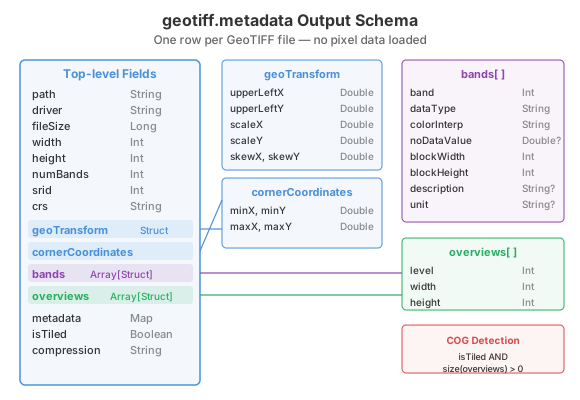
Each row represents one GeoTIFF file with the following columns:
| Column | Type | Description |
|---|---|---|
path |
String | File path |
driver |
String | Format driver ("GTiff") |
fileSize |
Long | File size in bytes |
width |
Int | Image width in pixels |
height |
Int | Image height in pixels |
numBands |
Int | Number of bands |
srid |
Int | EPSG code (0 if unknown) |
crs |
String | Coordinate Reference System as WKT |
geoTransform |
Struct | Affine transform parameters |
cornerCoordinates |
Struct | Bounding box |
bands |
Array[Struct] | Per-band metadata |
overviews |
Array[Struct] | Overview (pyramid) levels |
metadata |
Map[String, String] | File-wide TIFF metadata tags |
isTiled |
Boolean | Whether the file uses internal tiling |
compression |
String | Compression type (e.g., "LZW", "Deflate") |
geoTransform struct
| Field | Type | Description |
|---|---|---|
upperLeftX |
Double | Origin X in world coordinates |
upperLeftY |
Double | Origin Y in world coordinates |
scaleX |
Double | Pixel size in X direction |
scaleY |
Double | Pixel size in Y direction |
skewX |
Double | Rotation/shear in X |
skewY |
Double | Rotation/shear in Y |
cornerCoordinates struct
| Field | Type | Description |
|---|---|---|
minX |
Double | Minimum X (west) |
minY |
Double | Minimum Y (south) |
maxX |
Double | Maximum X (east) |
maxY |
Double | Maximum Y (north) |
bands array element
| Field | Type | Description |
|---|---|---|
band |
Int | Band number (1-indexed) |
dataType |
String | Data type (e.g., "REAL_32BITS") |
colorInterpretation |
String | Color interpretation (e.g., "Gray", "Red") |
noDataValue |
Double | NoData value (null if not set) |
blockWidth |
Int | Internal tile/block width |
blockHeight |
Int | Internal tile/block height |
description |
String | Band description |
unit |
String | Unit type (e.g., "meters") |
overviews array element
| Field | Type | Description |
|---|---|---|
level |
Int | Overview level (1, 2, 3, ...) |
width |
Int | Overview width in pixels |
height |
Int | Overview height in pixels |
Examples
Inspect band information
df = sedona.read.format("geotiff.metadata").load("/path/to/image.tif")
df.selectExpr("path", "explode(bands) as band").selectExpr(
    "path",
    "band.band",
    "band.dataType",
    "band.noDataValue",
    "band.blockWidth",
    "band.blockHeight",
).show()
Filter by spatial extent
df = sedona.read.format("geotiff.metadata").load("/path/to/rasters/")
df.filter("cornerCoordinates.minX > -120 AND cornerCoordinates.maxX < -100").select(
    "path", "width", "height", "srid"
).show()
Get overview details
df = sedona.read.format("geotiff.metadata").load("/path/to/image.tif")
df.selectExpr("path", "explode(overviews) as ovr").selectExpr(
    "path", "ovr.level", "ovr.width", "ovr.height"
).show()
Select specific columns
Select only the columns you need:
df = (
    sedona.read.format("geotiff.metadata")
    .load("/path/to/rasters/")
    .select("path", "width", "height", "numBands")
)
df.show()