RS_MapAlgebra
Introduction: Apply a map algebra script on a raster.
Warning
RS_MapAlgebra is deprecated since v1.9.1 and will be removed in a future version. Use a
Raster UDF instead, which expresses the same per-pixel calculations in Python
and additionally reaches NumPy, SciPy, scikit-learn, and rasterio. See the
Raster UDF page for the same NDVI example
written both ways, and migrate existing scripts.
Format:
RS_MapAlgebra (raster: Raster, pixelType: String, script: String)
RS_MapAlgebra (raster: Raster, pixelType: String, script: String, noDataValue: Double)
RS_MapAlgebra(rast0: Raster, rast1: Raster, pixelType: String, script: String, noDataValue: Double)
Return type: Raster
Since: v1.5.0
RS_MapAlgebra runs a script on a raster. The script is written in a map algebra language called Jiffle. The script takes a raster
as input and returns a raster of the same size as output. The script can be used to apply a map algebra expression on a raster. The input raster is named rast in the Jiffle script, and the output raster is named out.
SQL Example
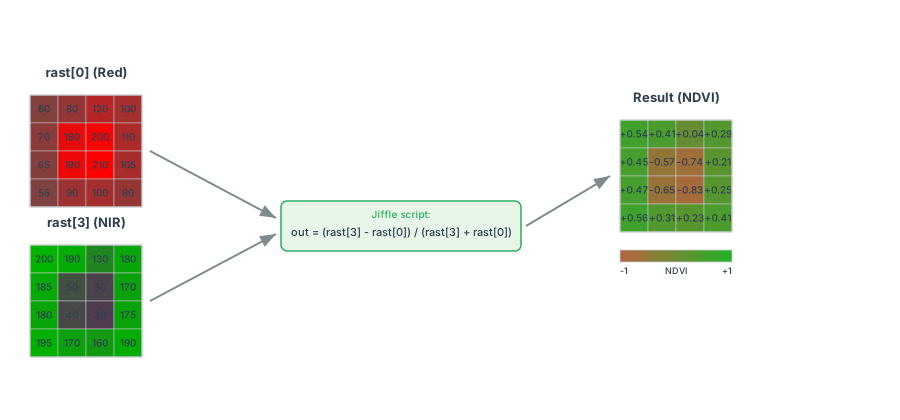
Calculate the NDVI of a raster with 4 bands (R, G, B, NIR):
-- Assume that the input raster has 4 bands: R, G, B, NIR
-- rast[0] refers to the R band, rast[3] refers to the NIR band.
SELECT RS_MapAlgebra(rast, 'D', 'out = (rast[3] - rast[0]) / (rast[3] + rast[0]);') AS ndvi FROM raster_table
Output:
+--------------------+
|              raster|
+--------------------+
|GridCoverage2D["g...|
+--------------------+
Spark SQL Example for two raster input RS_MapAlgebra:
RS_MapAlgebra(rast0, rast1, 'D', 'out = rast0[0] * 0.5 + rast1[0] * 0.5;', null)
For more details and examples about RS_MapAlgebra, please refer to the Map Algebra documentation.
To learn how to write map algebra script, please refer to Jiffle language summary.
To express the same calculation in Python with NumPy or rasterio instead, see Raster UDFs.