与 GeoPandas 和 Shapely 配合使用
Note
Sedona 1.6.0 之前的版本仅支持 Shapely 1.x。如需使用 Shapely 2.x,请使用 1.6.0 及以上的 Sedona。
如果您使用 Sedona < 1.6.0,请安装 GeoPandas <= 0.11.1,因为 GeoPandas > 0.11.1 会自动安装 Shapely 2.0;如果使用 Shapely,请安装 <= 1.8.5。
与 GeoPandas 互通
Sedona Python 已实现序列化器与反序列化器,可以将 Sedona Geometry 对象转换为 Shapely 的 BaseGeometry。基于此,您可以用 GeoPandas 从文件加载数据(驱动可参考 Fiona 支持的列表),并基于 GeoDataFrame 创建 Spark DataFrame。
从 GeoPandas 到 Sedona DataFrame
使用 GeoPandas 的 read_file 方法从 shapefile 加载数据,并基于 GeoDataFrame 创建 Spark DataFrame:
import geopandas as gpd
from sedona.spark import *

config = SedonaContext.builder().getOrCreate()

sedona = SedonaContext.create(config)

gdf = gpd.read_file("gis_osm_pois_free_1.shp")

sedona.createDataFrame(gdf).show()
输出如下:
+---------+----+-----------+--------------------+--------------------+
|   osm_id|code|     fclass|                name|            geometry|
+---------+----+-----------+--------------------+--------------------+
| 26860257|2422|  camp_site|            de Kroon|POINT (15.3393145...|
| 26860294|2406|     chalet|      Leśne Ustronie|POINT (14.8709625...|
| 29947493|2402|      motel|                null|POINT (15.0946636...|
| 29947498|2602|        atm|                null|POINT (15.0732014...|
| 29947499|2401|      hotel|                null|POINT (15.0696777...|
| 29947505|2401|      hotel|                null|POINT (15.0155749...|
+---------+----+-----------+--------------------+--------------------+
如需借助 Arrow 优化加快转换速度,可以使用 create_spatial_dataframe,它接收 SparkSession 与 GeoDataFrame 作为参数,返回 Sedona DataFrame:
def create_spatial_dataframe(
    spark: SparkSession, gdf: gpd.GeoDataFrame
) -> DataFrame: ...
- spark:SparkSession
- gdf:gpd.GeoDataFrame
- 返回:DataFrame
示例:
from sedona.spark.geoarrow import create_spatial_dataframe

create_spatial_dataframe(spark, gdf)
从 Sedona DataFrame 到 GeoPandas
用 Spark 读取数据并转换为 GeoPandas:
import geopandas as gpd
from sedona.spark import *

config = SedonaContext.builder().getOrCreate()

sedona = SedonaContext.create(config)

counties = (
    sedona.read.option("delimiter", "|").option("header", "true").csv("counties.csv")
)

counties.createOrReplaceTempView("county")

counties_geom = sedona.sql("SELECT *, st_geomFromWKT(geom) as geometry from county")

df = counties_geom.toPandas()
gdf = gpd.GeoDataFrame(df, geometry="geometry")

gdf.plot(
    figsize=(10, 8),
    column="value",
    legend=True,
    cmap="YlOrBr",
    scheme="quantiles",
    edgecolor="lightgray",
)
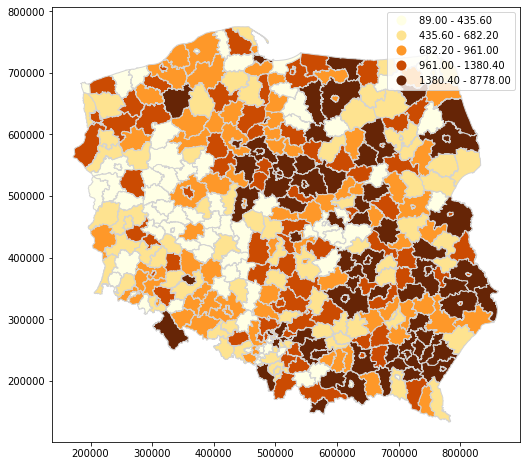
也可以尝试通过 GeoArrow 转换为 GeoPandas,对于大型结果集这种方式可能显著更快(要求 geopandas >= 1.0)。
import geopandas as gpd
from sedona.spark import dataframe_to_arrow

config = SedonaContext.builder().getOrCreate()

sedona = SedonaContext.create(config)

test_wkt = ["POINT (0 1)", "LINESTRING (0 1, 2 3)"]
df = sedona.createDataFrame(zip(test_wkt), ["wkt"]).selectExpr(
    "ST_GeomFromText(wkt) as geom"
)

gpd.GeoDataFrame.from_arrow(dataframe_to_arrow(df))
与 Shapely 对象互通
支持的 Shapely 对象
| Shapely 对象 | 是否支持 |
|---|---|
| Point |  |
| MultiPoint | |
| LineString | |
| MultiLinestring | |
| Polygon | |
| MultiPolygon | |
| GeometryCollection | |
要基于上述几何类型创建 Spark DataFrame,请使用 sedona.sql.types 模块下的 GeometryType。该转换支持包含 Shapely 对象的 list 或 tuple。
针对包含整型 id 与几何类型的目标表,schema 可以这样定义:
from pyspark.sql.types import IntegerType, StructField, StructType

from sedona.spark import *

schema = StructType(
    [
        StructField("id", IntegerType(), False),
        StructField("geom", GeometryType(), False),
    ]
)
同样,包含几何类型列的 Spark DataFrame 可以通过 collect 方法转换为 Shapely 对象列表。
Point 示例
from shapely.geometry import Point

data = [[1, Point(21.0, 52.0)], [1, Point(23.0, 42.0)], [1, Point(26.0, 32.0)]]


gdf = sedona.createDataFrame(data, schema)

gdf.show()
+---+-------------+
| id|         geom|
+---+-------------+
|  1|POINT (21 52)|
|  1|POINT (23 42)|
|  1|POINT (26 32)|
+---+-------------+
gdf.printSchema()
root
 |-- id: integer (nullable = false)
 |-- geom: geometry (nullable = false)
MultiPoint 示例
from shapely.geometry import MultiPoint

data = [[1, MultiPoint([[19.511463, 51.765158], [19.446408, 51.779752]])]]

gdf = sedona.createDataFrame(data, schema).show(1, False)
+---+---------------------------------------------------------+
|id |geom                                                     |
+---+---------------------------------------------------------+
|1  |MULTIPOINT ((19.511463 51.765158), (19.446408 51.779752))|
+---+---------------------------------------------------------+
LineString 示例
from shapely.geometry import LineString

line = [(40, 40), (30, 30), (40, 20), (30, 10)]

data = [[1, LineString(line)]]

gdf = sedona.createDataFrame(data, schema)

gdf.show(1, False)
+---+--------------------------------+
|id |geom                            |
+---+--------------------------------+
|1  |LINESTRING (10 10, 20 20, 10 40)|
+---+--------------------------------+
MultiLineString 示例
from shapely.geometry import MultiLineString

line1 = [(10, 10), (20, 20), (10, 40)]
line2 = [(40, 40), (30, 30), (40, 20), (30, 10)]

data = [[1, MultiLineString([line1, line2])]]

gdf = sedona.createDataFrame(data, schema)

gdf.show(1, False)
+---+---------------------------------------------------------------------+
|id |geom                                                                 |
+---+---------------------------------------------------------------------+
|1  |MULTILINESTRING ((10 10, 20 20, 10 40), (40 40, 30 30, 40 20, 30 10))|
+---+---------------------------------------------------------------------+
Polygon 示例
from shapely.geometry import Polygon

polygon = Polygon(
    [
        [19.51121, 51.76426],
        [19.51056, 51.76583],
        [19.51216, 51.76599],
        [19.51280, 51.76448],
        [19.51121, 51.76426],
    ]
)

data = [[1, polygon]]

gdf = sedona.createDataFrame(data, schema)

gdf.show(1, False)
+---+--------------------------------------------------------------------------------------------------------+
|id |geom                                                                                                    |
+---+--------------------------------------------------------------------------------------------------------+
|1  |POLYGON ((19.51121 51.76426, 19.51056 51.76583, 19.51216 51.76599, 19.5128 51.76448, 19.51121 51.76426))|
+---+--------------------------------------------------------------------------------------------------------+
MultiPolygon 示例
from shapely.geometry import MultiPolygon

exterior_p1 = [(0, 0), (0, 2), (2, 2), (2, 0), (0, 0)]
interior_p1 = [(1, 1), (1, 1.5), (1.5, 1.5), (1.5, 1), (1, 1)]

exterior_p2 = [(0, 0), (1, 0), (1, 1), (0, 1), (0, 0)]

polygons = [Polygon(exterior_p1, [interior_p1]), Polygon(exterior_p2)]

data = [[1, MultiPolygon(polygons)]]

gdf = sedona.createDataFrame(data, schema)

gdf.show(1, False)
+---+----------------------------------------------------------------------------------------------------------+
|id |geom                                                                                                      |
+---+----------------------------------------------------------------------------------------------------------+
|1  |MULTIPOLYGON (((0 0, 0 2, 2 2, 2 0, 0 0), (1 1, 1.5 1, 1.5 1.5, 1 1.5, 1 1)), ((0 0, 0 1, 1 1, 1 0, 0 0)))|
+---+----------------------------------------------------------------------------------------------------------+
GeometryCollection 示例
from shapely.geometry import GeometryCollection, Point, LineString, Polygon

exterior_p1 = [(0, 0), (0, 2), (2, 2), (2, 0), (0, 0)]
interior_p1 = [(1, 1), (1, 1.5), (1.5, 1.5), (1.5, 1), (1, 1)]
exterior_p2 = [(0, 0), (1, 0), (1, 1), (0, 1), (0, 0)]

geoms = [
    Polygon(exterior_p1, [interior_p1]),
    Polygon(exterior_p2),
    Point(1, 1),
    LineString([(0, 0), (1, 1), (2, 2)]),
]

data = [[1, GeometryCollection(geoms)]]

gdf = sedona.createDataFrame(data, schema)

gdf.show(1, False)
+---+-------------------------------------------------------------------------------------------------------------------------------------------------------------------------+
|id |geom                                                                                                                                                                     |
+---+-------------------------------------------------------------------------------------------------------------------------------------------------------------------------+
|1  |GEOMETRYCOLLECTION (POLYGON ((0 0, 0 2, 2 2, 2 0, 0 0), (1 1, 1 1.5, 1.5 1.5, 1.5 1, 1 1)), POLYGON ((0 0, 1 0, 1 1, 0 1, 0 0)), POINT (1 1), LINESTRING (0 0, 1 1, 2 2))|
+---+-------------------------------------------------------------------------------------------------------------------------------------------------------------------------+